

4star live gameplay guide!
Here you can find a complete guide of 4star Live's gameplay, from navigating the home screen to playing live shows!
title screen

This is the screen you're met with when you open the game, you can tap anywhere to open the game. A character will say the game's name upon tapping, and each character has their own voice line for saying the title of the game.
Menu:
Tap the top left to access the support menu, where there are a variety of options such as a bug report form, terms of service, data transfer options, contact forms, scouting errors, suggestions, language options and more.
Team select

When opening the game for the first time, you will be greeted with the team select screen, where you can read through each units bio and pick your favourite. Upon picking a unit, you will recieve their 4 Initial rare cards to play the game with, as well as their stage as a home screen background. However, It doesn't matter what you pick, because you can always get the other cards in gacha, and other screens through tasks.
home screen
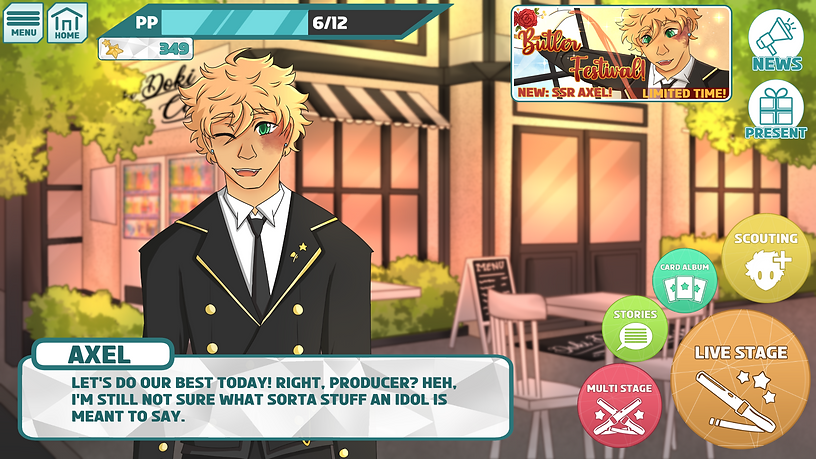
This is the game's main hub' of sorts. It is the screen that shows up after you enter the game, and has all the buttons you need to navigate the full game. It also contains news, event banners, and a character to the left that'll say various voice lines in intervals, or when tapped on. The character on your home screen can be changed in the menu, or be set to 'random' to have a random character show up every time you enter the home screen.
Live Stage:
Takes you to the song select screen, where you can select a song to play on the live stage.
Multi-Stage:
Like Live Stage, but Multi-Stage will take you to a multiplayer waiting room, where you will be matched up with 3 other players to play a Multi Live together.
Stories:
Takes the player to the story menu, where they can select a story to read that is in a visual novel game style.
Card Album:
Takes the player to an album of all the cards they have collected, which can be sorted in many ways including rarity, level, overall power, attribute, etc.
Scouting:
Will take you to 4star Live's scouting (gacha) screen, where you can pay star pieces to roll for new cards.
Present:
Takes the player to the present box, where they can collect rewards and prizes from Live Stages, Multi Lives, Login bonuses and Events.
News:
Shows the player any news and update information.
Sliding Banner:
Shows all currently running events or campaigns. In this screenshot, the 'Butler Festival' Event is running (See the events page for more information on Butler Festival!).
Status Bar:
A bar that shows how much PP (Play points) a player has, as well as how many star pieces they have.
Character Profile

Character profiles show information about a character and is where you can select characters to put on your home screen. It contains a basic bio, as well as an avatar of the character to the left wearing an outfit you have selected for them.
Change Outfit:
Change the character's outfit by choosing outfits you have unlocked on their idol roads. For example, Axel's "Bright-eyed butler" outfit is obtained by unlocking the outfit on that card's idol road.
Cards List:
Shows all cards that have been released for this character, in order of when they were released. Cards you have not obtained will be greyed out.
Primary Attribute:
Like the 4 units, each character has its own primary attribute. Their cards are more likely to be this attribute, and they perform better in songs that match their attribute. For example, Axel's attribute is cute, which means he would have more Cute cards than Lana (who has the Passionate Attribute), and performs better in Cute attribute songs.
Card album

In the card album, you can look at the cards you have collected in-game so far and select them to get to level them up, unlock steps in their idol road, or switch their artworks around! By default, the list will appear in order of rarity with the rarest at the top, but you can change how your cards are ordered and sorted.
Search:
Search for a specific character or unit in your cards list.
Sort By:
Sort your cards in order of level, rarity, power, attribute, etc.
Order From:
Order your cards from highest to lowest, lowest to highest, etc.
Rarity Buttons:
Select if you are looking for a certain rarity of cards only. For example, Rares and Super rares.
Attribute Buttons:
Select if you are looking for a certain card attribute. For example, Cute & Cool cards, or Cool & Elegant cards.
Idol road

In the idol road, you can upgrade your cards by progressing through a skill tree, a pathway with many tangents that contain boosts to attribute scores, Live skill boosts, character story unlocks, costumes, and more! At the end of the road, the card can be upgraded where it gets a boost to all attribute scores and new artwork!
Attribute Boosts:
Boost one of your card attributes by a certain amount. The card's main attribute will always be the highest out of all 4 attributes, even with a maxed-out idol road.
Costume Unlock:
Unlocks a costume for the character that can be used on the home screen, and in 3d lives.
Live Skill Boosts:
Increases the power of the cards Live Skill Boost. For example, an "Increases stamina when in a pinch up to 3 times" skill can be upgraded to 5, or even 10 times in the idol road (depending on the rarity of the card).
Story Unlocks:
Unlocks chapters of character stories that can be read in the 'Character Story' Section of the Story Menu.
Story menu

Stories in 4star Live are portrayed in a visual novel style, where the player taps to progress through the storyline. While there is usually no intervention required by a player, in character stories and mini talks, players can select responses that'll change how the characters react! The main story contains 5 stories, 1 for each group that explains the story of how they formed, and 1 overarching story. Event stories tie into these main stories, by telling shorter stories that fit between major events. Event stories are not told in a linear order, and can take place at any point in the narrative.
Main Story:
Enters the menu for the main story, where the player can select what unit's story they want to read.
Event Stories:
Takes the player to all the event stories that have happened so far. While event stories are initially limited to how many chapters a player unlocks in an event, after 3 months the full stories are added for everyone to read.
Character Stories:
Stories that are unlocked through idol roads, as well as through bonding with the character (playing with them in Live Stages). They are short, one-off stories that usually only star themselves, or themselves and 1 or 2 other characters.
Mini Talks:
Mini talks take place during events, as well as during special events like birthdays, anniversaries, holidays and more. They are brief, with only a few text boxes worth of dialogue.
Stories

As stated above, stories in 4star Live are portrayed in a visual novel style, where the player taps to progress through the storyline.
Menu:
Opens up a small menu where the player can speed up, slow down, auto play or skip stories/scenes.
Scouting

Scouting is 4star Live's gacha system. It's the fastest way to get cards, and new cards are released every month! Each scout box shows up on the left, with some being limited and some being permanent. Rarities are displayed in the top left, with cheaper scouts having lower chances of SR's and SSR's. Your star pieces counter is displayed in the top right, and the player has the option to either scout for 1 card, or scout for 10.
Scout 1:
Scout for 1 card.
Scout 10:
Scout for 10 cards.
Events

Events are oppotunities for players to get limited edition, rare cards with stronger skills and nicer outfits! They last 2 weeks, and players collect points by doing Live shows, Multi Lives, completing goals, maxing out idol roads, scouting and more! Each point milestone gives the player a reward, with SR Event cards being given at 50,000, and SSR Event cards being given at 100,000.
Event Shop:
A limited time shop where players can use event tickets (collected from point milestones and Live stages) and exchange them for items such as star pieces, outfits, common cards etc.
Live Stage & Multi Stage:
Take the player to the Live Stage & Multi Stage menus.
Song select

After selecting Live Stage, the player can select the song they'd like to play by swiping through the songs. Below, the name of the song is displayed as well as who performs it, and the songs level at the difficulty selected (difficulty is listed at anywhere between 1 and 10). This also displays the songs main attribute (for Kraken Conundrum, the attribute is cool), and your high score & top combo for that song. Tapping the album you want to play will take you to the team select screen.
PP Usage:
Play Point usage can be changed, and how much exp and event points you gain from the song changes depending on how much pp is used. If a player uses 10pp on one song, they will get 10pp's worth of exp & event points.
team select

Upon selecting a song, the player is taken to a screen where they can select what team they'd like to use for the song. It'll also display the song, attribute and difficulty in the top left for you to double check before you begin the song. It'll remind you of the Leader skill of your center card, as well as the support skill of your support card.
Costumes:
Lets you change the costumes your team wears during a 3D Live.
Team:
Lets you switch teams, and switch cards within your team
Switch:
Allows you to swap the placement of cards in your team.
Fever:
Lets you pick the character you want the fever time to focus on in the song.
Auto-Team:
Automatically creates a team of your strongest cards that are best for the song.
Live Start!:
Allows you to begin the Live.
rhythm game

The rhythm game portion is like most rhythm games, where you tap notes as they appear on the screen at the right time.


You hit the note at the perfect time!
You almost hit it at the perfect time!


You hit it at an ok time, a little too early!
You either hit it too early, or too late!

Oh no, you missed the note!

Simple notes, all you need to do is tap these to clear them!

To clear these notes, swipe right!

To clear these notes, swipe left!

To clear these notes, hold down till the next hold note!
Task list

The task list contains a variety of goals for the player to achieve over their time playing, and come in a variety of different tasks. Upon completing them, the player is rewarded with in-game items such as stars, training tickets, event tickets or pp boosts.
Focus Tasks:
Tasks that focus on certain units or characters, where you complete tasks surrounding that character or unit.
Event Tasks:
Tasks to complete during an event period, usually rewarding star pieces or event tickets.
Daily Tasks:
Small tasks that can be completed daily by the player for smaller rewards. Expire after 24 hours
Weekly Tasks:
Larger tasks that can be completed over 1 week for larger rewards. Expire after 7 days.
Items
